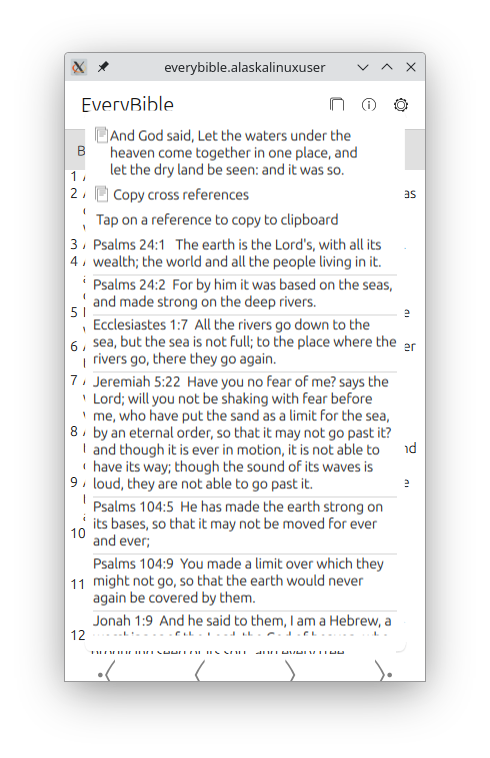
Another milestone was reached today on my work with EveryBible [2], a Bible application for Ubuntu Touch that features 140 different translations. Today I have wrapped up the commits for displaying cross references!
The way it works is after selecting your version, book, and chapter, your verses are displayed. You can scroll through them, go back or forward a chapter, etc., but when you click on a verse, a popup will display allowing you to copy the verse, or copy the list of verse cross references, and it will display each cross referenced verse in a scrollable list. On that list, you can click on a verse to copy that to your clipboard as well!
The code for copying to the clipboard was rather interesting, and it goes like this:
onClicked: {
                                var mimeData = Clipboard.newData();
                                mimeData.text = "" + crossReferences;
                                Clipboard.push(mimeData);
                            }
Where you have to make a new data variable for the clipboard and then push things to it. There was a simpler, more direct method in the api-docs [1], but it didn't work that way for me, so I had to use this more in depth method. Most likely it is just a failure on my part to understand how it should work, but this certainly gets the job done!
When I was building the cross reference popup, I was trying to consider the end user use cases. In the end, I came to the (hopefully not flawed) conclusion that the average user of the EveryBible app does their deep, deep theological and Biblical studies elsewhere, and that this was more or less a reader tool for daily reading while being on a bus or train, or sitting at home in an easy chair. My other thought was that the user, being on a phone, might just be referencing something quickly, and then they want to text a verse or cross reference to a friend.
Only time and user review comments will tell if that is the way this is used or not, but I hope that it will be helpful to those "on the go". Feel free to check out the latest commits at the repo[3]!
Linux - keep it simple.
[1] https://ubports.gitlab.io/docs/api-docs/index.html?p=lomiriuserinterfacetoolkit%2Fqml-lomiri-components-clipboard.html [2] https://alaskalinuxuser3.ddns.net/Making%20EveryBible%20for%20Ubuntu%20Touch.html [3]https://gitlab.com/alaskalinuxuser/everybible